Plans
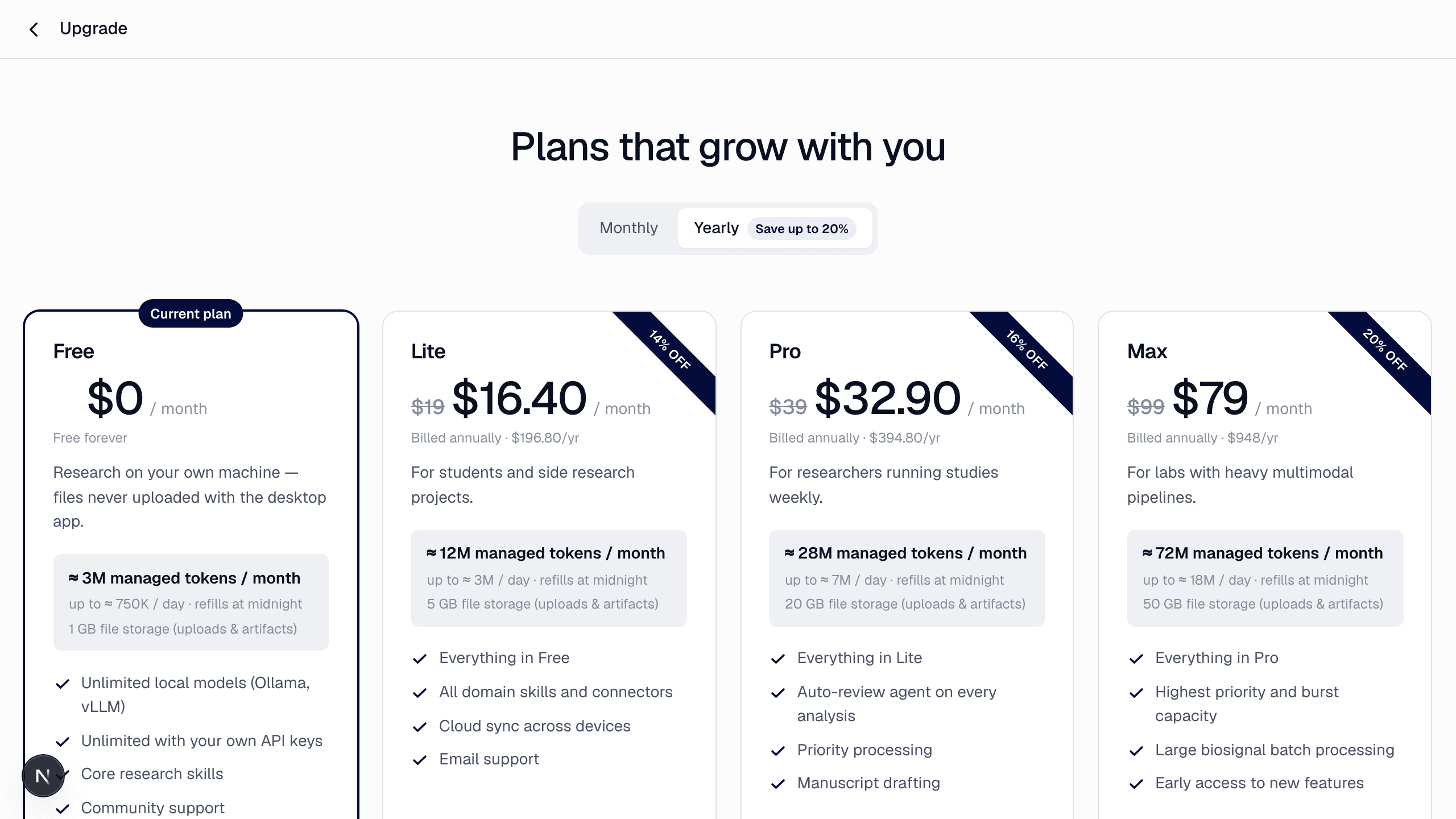
| Free | Lite | Pro | Max | |
|---|---|---|---|---|
| Price | $0 | $19/mo ($16.40 yearly) | $39/mo ($32.90 yearly) | $99/mo ($79 yearly) |
| Managed tokens / month (monthly billing) | ≈ 3M | ≈ 12M | ≈ 28M | ≈ 72M |
| Basic research turns / month* | ≈ 10–75 | ≈ 40–300 | ≈ 90–700 | ≈ 240–1,800 |
| Weekly cap (a quarter of the month) | ≈ 750K | ≈ 3M | ≈ 7M | ≈ 18M |
| Top-up bundles | — | ✓ | ✓ | ✓ |
| Storage | 1 GB | 5 GB | 20 GB | 50 GB |
| Premium models (incl. Claude Fable 5.1, GPT-6 Astra) | — | ✓ | ✓ | ✓ |
| Extras | Core skills, community support | All domain skills and connectors, cloud sync, email support | Auto-review agent on every analysis, priority processing, manuscript drafting | Highest priority and burst capacity, large biosignal batches, early access |
\* The higher figure is on light models such as GPT-6 Luna, the lower on Gemini 3.8 Flash; heavy models such as Claude Opus allow fewer. Deep turns use about twice a Basic turn, Lite turns about a quarter.
Korean-won prices are shown when your locale is Korean (₩28,900 / ₩58,900 / ₩148,900 monthly). Institutions get volume token allowances, invoicing, SSO and self-hosted (vLLM) support — contact us.
Managed tokens
Your plan's allowance is counted in managed tokens at a standard model's rate. Light models stretch it further, heavy ones less; the bars next to each model in the model menu show how fast it uses the allowance (one bar light, two standard, three heavy). Every answer shows the tokens it used, and the profile menu shows the month's remaining balance. Premium models use the allowance faster; Lite effort costs a fraction of Deep — see Effort levels & models.
- The monthly allowance resets on your billing date; unused tokens don't roll over.
- The weekly cap (a quarter of the monthly allowance, Monday to Sunday in your time zone) spreads the month so one heavy week can't exhaust it. When this week's tokens are used up, the composer says so and tells you when it refills (Monday).
- Yearly billing has a lower monthly price and the same monthly allowance as monthly billing — the discount applies to the price only.
- Top-ups: on paid plans you can buy one-time bundles (≈ 6.5M for $10 / ₩14,900, ≈ 19M for $29 / ₩43,900, ≈ 100M for $149 / ₩239,000) from the plan page. They are added to your balance immediately, never expire, are not limited by the weekly cap, and are used after your monthly allowance.
- Every paid plan can use every model, including the heaviest ones (Claude Fable 5.1, GPT-6 Astra); they simply use the allowance faster — the estimate in the Agent menu shows by how much.
- Before you send, the Agent menu shows roughly how many tokens the turn will use with the selected model and effort, and what share of this week's tokens that is.
- Turns that run on a local model or on your own API keys will never be billed — both come with the desktop app, which is being prepared for release.
Always free
The core research skills, reading everything you've already produced, and the Free plan's ≈ 3M managed tokens a month. The Free plan has no time limit. Local models and your own API keys will be added here when the desktop app, now being prepared for release, launches.
Upgrade, downgrade, cancel
Open Upgrade plan from the profile menu (or /plan) to change plans. Checkout, plan changes and cancellation run through Paddle, our payment partner; receipts arrive by email. A discount code can be entered at checkout. Upgrades apply immediately (the difference is charged pro rata); downgrades and cancellations take effect at the end of the current billing period — you keep your plan and remaining tokens until then, and the plan page shows the date with a button to withdraw the change.
Subscribing on iPhone (App Store)
In the iOS app, Upgrade plan (profile menu, or the card icon in the header) sells the same Lite, Pro and Max plans as auto-renewable subscriptions through Apple's in-app purchase. Prices appear in your App Store currency. A subscription bought in the app is billed by Apple and gives you the same plan and token allowance on the web.
A subscription is managed where it was started.
- Bought in the iOS app → change or cancel it in Settings › Apple Account › Subscriptions on your iPhone, or from the app's plan screen (Manage subscription). The web plan page shows it as "Managed in the App Store" and can't change it. Refunds for App Store purchases are handled by Apple at reportaproblem.apple.com.
- Bought on the web → change or cancel it from Upgrade plan (
/plan) on the web. The app shows your current plan and no purchase buttons. - One account holds one active paid subscription. To move it to the other platform, cancel it where it was started, wait until the current period ends (you keep your plan until then), and subscribe again on the other platform.
- Promotion codes and discount coupons apply to web checkout only.
- Top-ups in the app: on a paid plan, the app's Upgrade plan screen sells the same Small / Large / XL token bundles as in-app purchases billed by Apple; the tokens are added to your balance right away and work on the web too.
Subscribing on Android (Google Play)
In the Android app, Upgrade plan sells the same Lite, Pro and Max plans as auto-renewable subscriptions through Google Play billing, and the same Small / Large / XL token top-ups as one-time purchases. Prices appear in your Google Play currency. A subscription bought in the Android app is billed by Google and gives you the same plan and token allowance on the web and on iPhone.
The rule is the same as for the App Store: a subscription is managed where it was started. Bought in the Android app → change or cancel it in the Play Store app › Payments & subscriptions › Subscriptions, or from the app's plan screen (Manage subscription). The web plan page shows it as "Managed in Google Play" and can't change it; the iOS app shows your current plan and no purchase buttons. Upgrades apply immediately; downgrades take effect at the next renewal. Refunds for Google Play purchases are handled by Google from your Google Play order history. To move the subscription to the web or to iPhone, cancel it in Google Play, wait until the current period ends, then subscribe there.
Coupons
Promotion codes add managed tokens to your balance — see Coupons.