Start
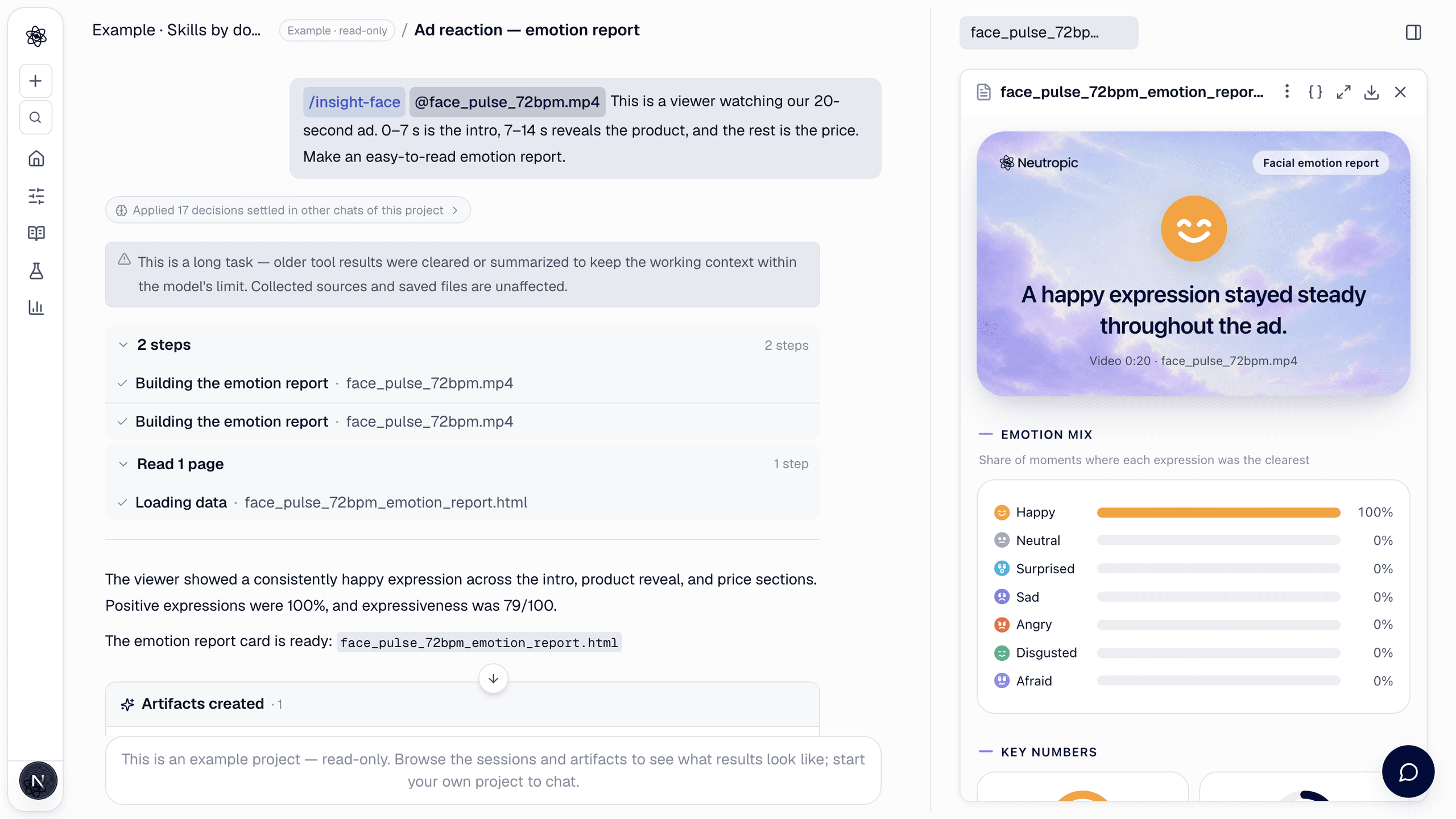
/insight-face This is a viewer watching our 20-second ad. 0–7 s is the intro, 7–14 s reveals the product, and the rest is the price.
Open Insight from View All Tools, or type /insight-face (or /insight). Attach a video (mp4, mov, webm) or a photo (jpg, png, webp, HEIC) in which the faces are visible from the front. Name the scenes if you want a reaction per scene; otherwise the video is split into equal parts. The report is made for marketing and events — ad or content reactions, pop-ups, unboxing, creator clips — not for clinical, hiring or personality assessment.
What happens
- Face analysis — five frames per second are scored for six basic emotions plus neutral from facial landmarks. One-frame blips, such as a blink or a mouth opening to speak, are smoothed out.
- Numbers come from code — the emotion mix, the key numbers, the flow, the highlights and the scene reactions are computed by code. The model only writes the headline, the short reading and the highlight captions, from those numbers.
- Plain language — no expert terms, no diagnosis or personality claims, and no guesses about liking or purchase intent. A smile is described as a smile.
- Several people — up to six faces are analysed and numbered from the left of the screen.
What you get
<file>_emotion_report.html — one card page:
- Headline card — the main expression and one sentence about what stood out.
- Emotion mix — the share of moments in which each expression was the clearest (neutral, happy, surprised, sad, angry, disgusted, afraid).
- Key numbers — positive expressions (%), expressiveness (/100), emotional range (/100) and facing the screen (%).
- Emotion flow — a positive↔negative curve with a ribbon of the main expression over time.
- Highlights — up to three moments (biggest smile, strongest reaction, most surprised, biggest frown) with a face thumbnail.
- Reaction by scene, then the reading and a note on the limits.
A photo gets a short card: expression scores (0–100) and two numbers, positivity and intensity. With several people, the card adds a person-by-person comparison, the time they smiled together and a tab for each person.
Ask for extra items when you need them: reaction style in this clip, head movement and moments looking away, one emotion in detail ("show the smiles in detail") and an expert AU appendix.
The download button saves the card as a PNG image — for a group, every person is expanded in the image. The report is not downloaded as HTML.
Notes
- Results are estimates from facial movement and can differ from how the person actually feels. Do not use them to judge people, for example in hiring or evaluations.
- Use a well-lit clip with faces toward the camera. When faces are often turned away or hidden, the report says the reading is less certain.
- People are told apart by their position on screen, not by who they are. If people swap places, the numbering can mix.
- Heart rate is not part of this card.
- Record and upload only people who agreed to it.