Every heartbeat pushes a little more blood into the skin of the face. The skin's colour shifts very slightly with each pulse, too little to see but enough for a camera to record. Remote photoplethysmography (rPPG) recovers that signal from ordinary video and turns it into a heart rate. For studies where a chest strap or finger clip would get in the way, such as screen-based experiments, interviews or recorded sessions you already have, it offers a physiological measure without contact sensors.
This post shows how rPPG works in Neutropic, what it returns, how it was checked, and where it stops being trustworthy. The screenshots come from the face-video session in the example project every account can open (Example · Skills by domain), run on a sample video whose pulse is known.
What you upload
Upload a video of a face: MP4, MOV, WebM, AVI, MKV or M4V. The in-app preview uses your browser's own video player, so H.264 MP4 is the safest choice if you also want to watch the clip in Neutropic. The analysis decodes the file on the server either way. Uploads can be up to 1 GB.
For a usable signal:
- The face is visible and roughly frontal for most of the clip. At least 5 seconds of frames with a detected face are required, and longer is better.
- Lighting is steady. A lamp flickering, sunlight moving across the face or a monitor changing brightness all add colour changes that have nothing to do with the pulse.
- The frame rate is at least 8 fps. Standard 25–30 fps webcam video is fine.
Then ask in plain words:
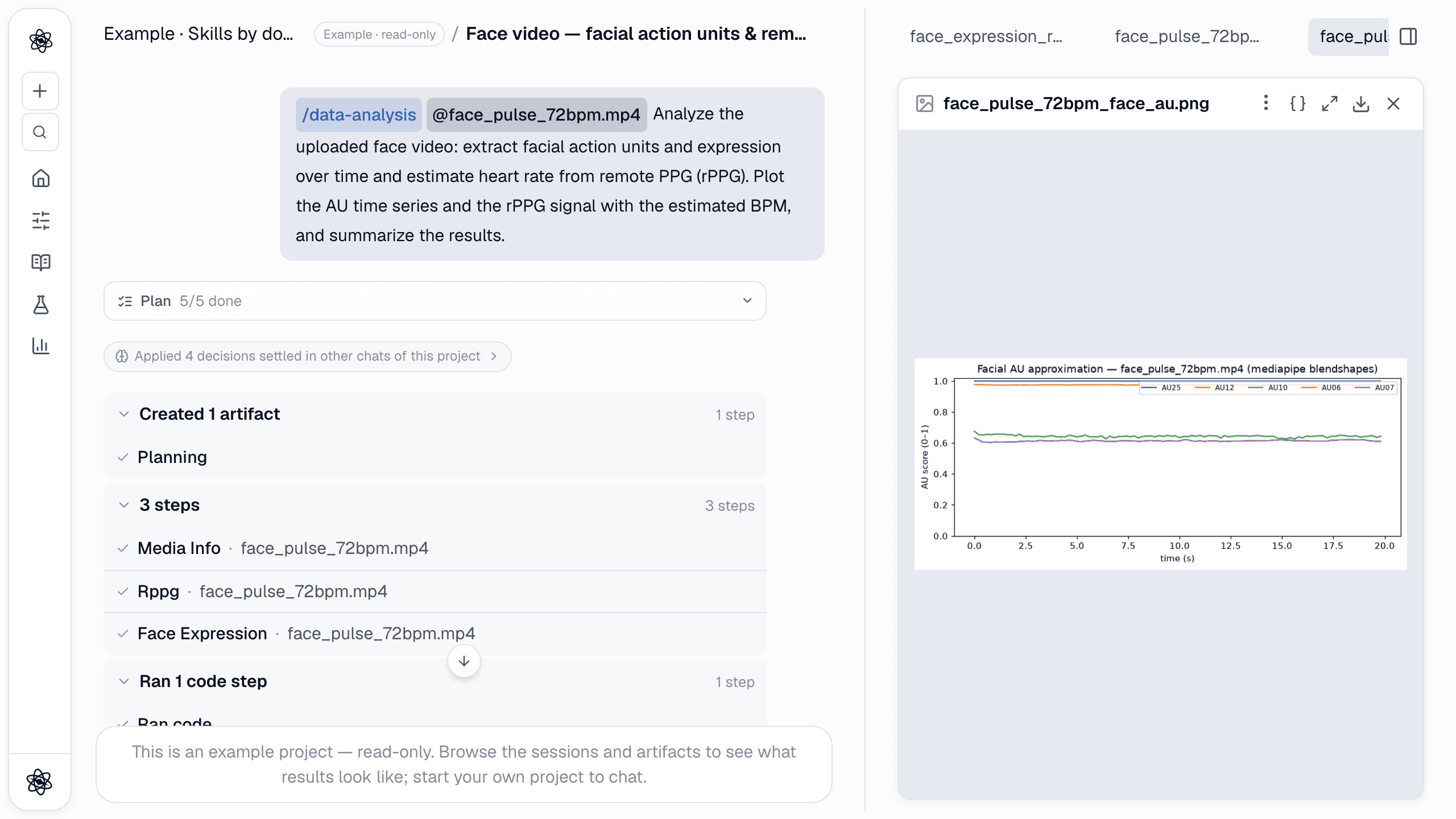
/analyze Estimate heart rate from face_pulse_72bpm.mp4 with remote PPG. Compare the POS, CHROM and GREEN methods, report the SNR of each, and plot the pulse signal and its spectrum.
What happens, step by step
The data-analysis skill calls media_info first to read the frame rate, resolution and duration. It then calls the rppg tool, which does the following:
- Finds the face. A MediaPipe face detector runs about once per second. Between detections the box is kept, so the region stays stable.
- Averages the skin colour. The region is the inner part of the face box (20–80 % of its width, 10–70 % of its height), where forehead and cheeks dominate. The mean red, green and blue values are taken for every frame.
- Extracts the pulse using up to three published algorithms: GREEN (Verkruysse et al., 2008), CHROM (de Haan & Jeanne, 2013) and POS (Wang et al., 2017). POS is the default. Ask for all three and you get all three.
- Filters and measures. The signal is band-passed to 0.7–4.0 Hz (42–240 bpm), and the heart rate is read from the peak of the power spectrum. The SNR compares power within ±0.1 Hz of that peak with the rest of the band. A second estimate is derived from the individual beats (a peak-based heart rate and RMSSD).
What you get back
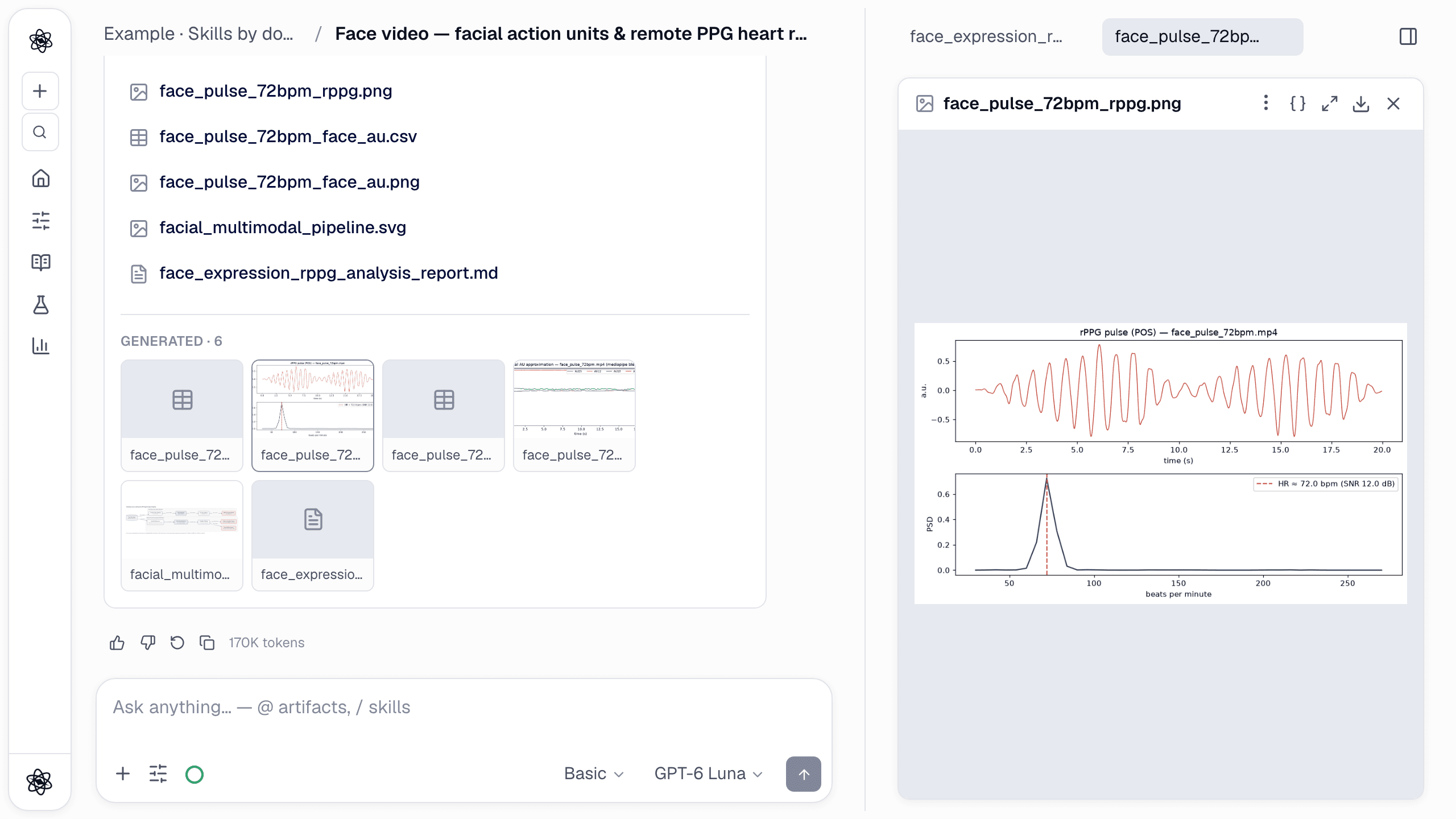
- A figure (
*_rppg.png) for the primary method: the filtered pulse over time, and the spectrum in beats per minute with the estimated rate marked. - A table (
*_rppg.csv) with the time, the mean R, G and B of the face region per frame, and the filtered signal of each method. You can re-plot it or feed it into your own pipeline. - The numbers, per method: the heart rate, the peak frequency, the SNR, the peak-based heart rate, RMSSD and the beat count. The tool also returns the paper reference of each method.
- A report written from those numbers, with each figure and table keeping the tool call that produced it. Press { } in the artifact panel to see it.
How it was checked
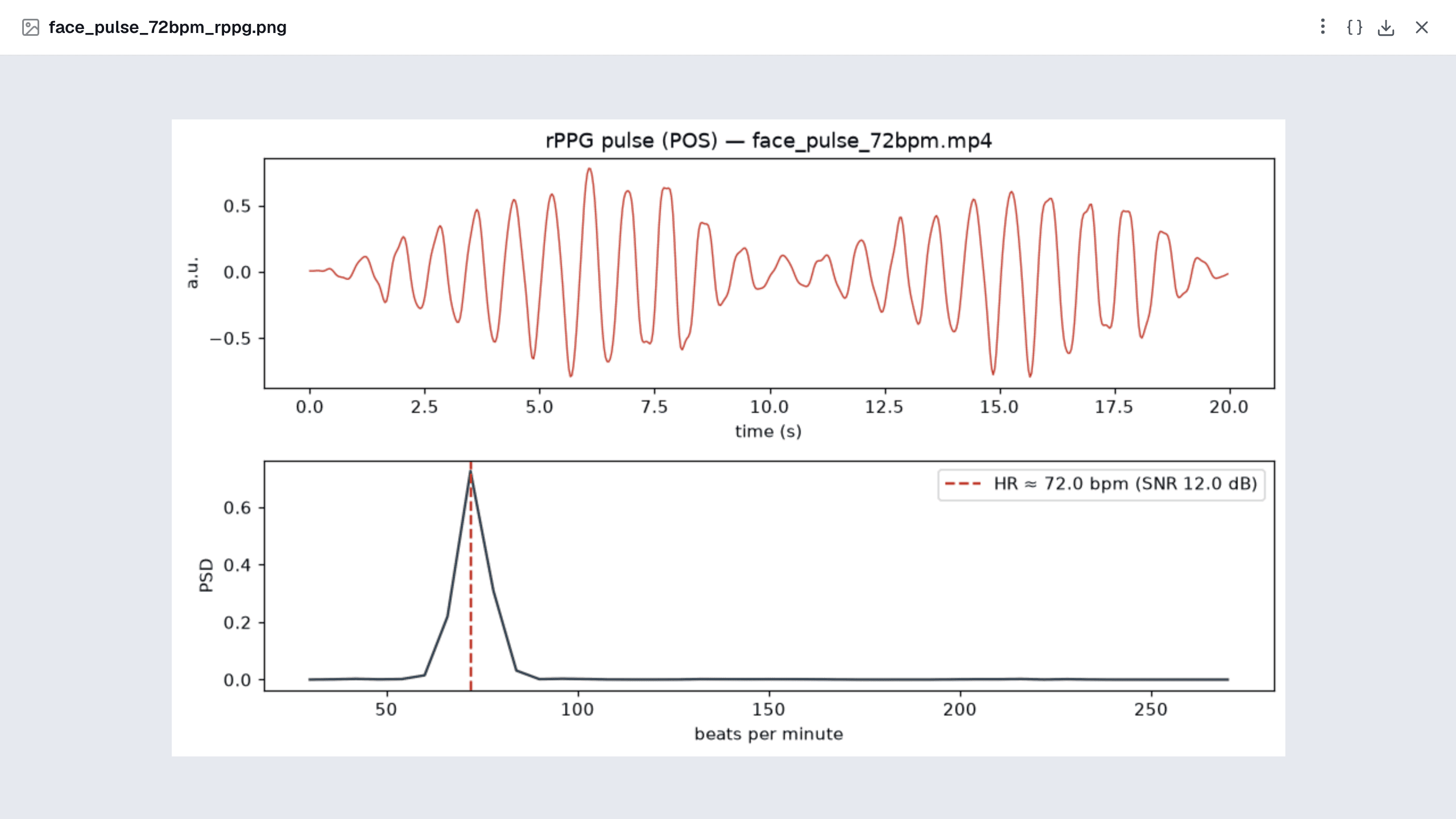
A heart-rate tool is only useful if it finds a heart rate that is actually there. We tested it on a video whose answer was known in advance. We took a still photo of a smiling face and made a 20-second, 30 fps clip in which the skin colour was modulated at exactly 72 beats per minute. Slow lighting drift was added on top, so the method could not simply latch on to a clean sine wave.
Our internal validation log records the results. All 600 of the 600 frames had a detected face. POS, CHROM and GREEN each returned 72.0 bpm, with SNRs of 12.0, 11.1 and 13.5 dB. Separately, the unit tests feed a synthetic 72 bpm colour trace into all three methods and check that they return 72.0, and that they follow the signal when it is changed to 96 bpm.
The report in the example session puts the three methods side by side, with the paper behind each one:
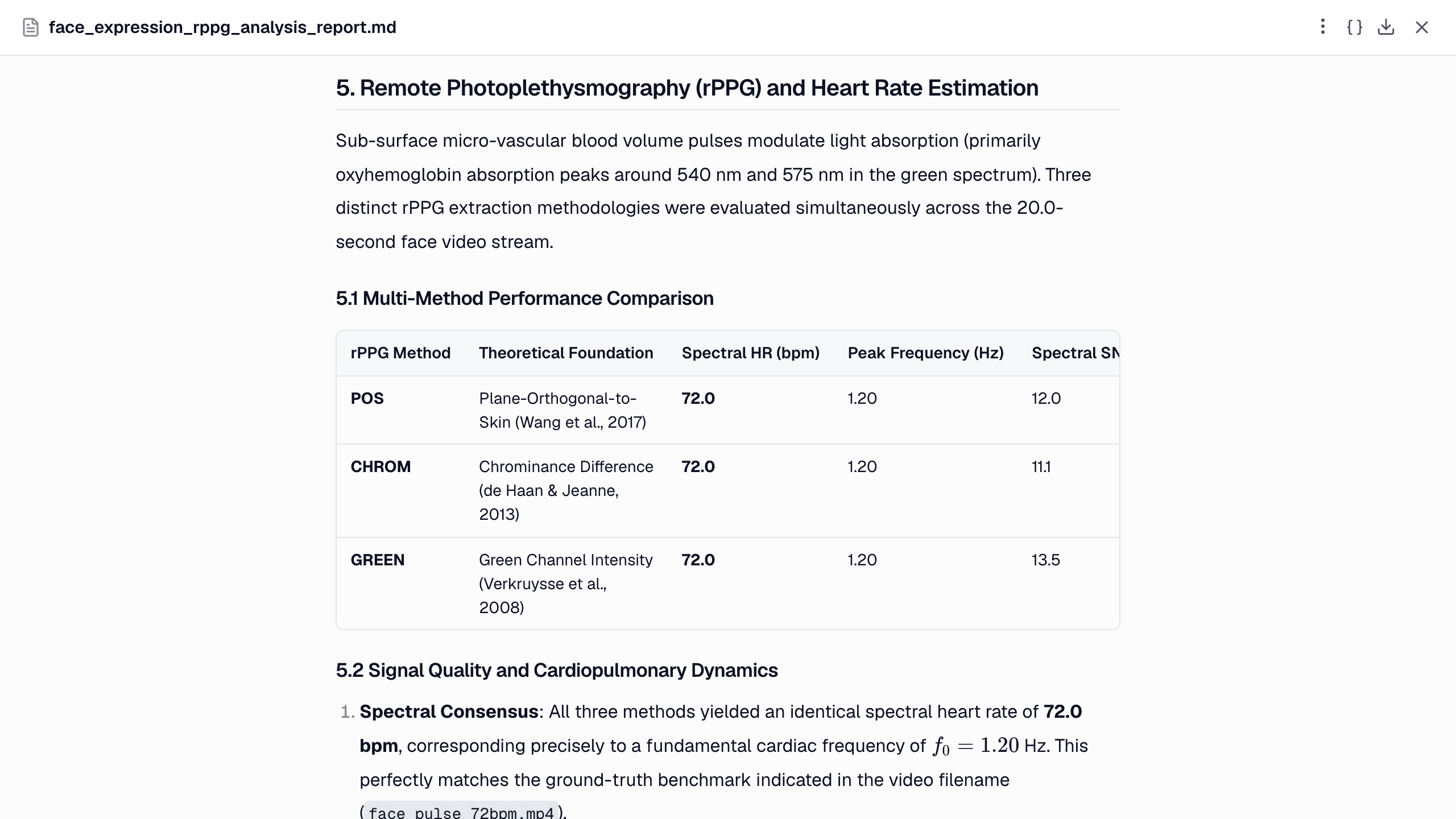
Treat this as a check that the pipeline works, not as a validation study. A synthetic clip has no head movement, no talking, no skin-tone range and no camera compression artefacts. Before relying on rPPG for a research claim, check it against a contact reference (ECG or a finger PPG) recorded at the same time on a subset of your own participants.
Reading the result: agreement and SNR
Two numbers tell you how far to trust an estimate, and the tool reports both.
- SNR. A low or negative SNR means the spectral peak barely stands out from noise. The tool's own rule of thumb is that an SNR below 0 dB makes the estimate unreliable.
- Agreement between methods. POS, CHROM and GREEN handle motion and lighting differently. If they disagree by more than 5 bpm, something other than the pulse is driving the signal. That usually means motion, a lighting change or a face that is too small.
Running all three methods (method: all) costs little and gives you this cross-check for free. The agent is instructed to report the SNR and the difference between methods alongside the heart rate, not just the rate.
Heart rate is fine; HRV needs care
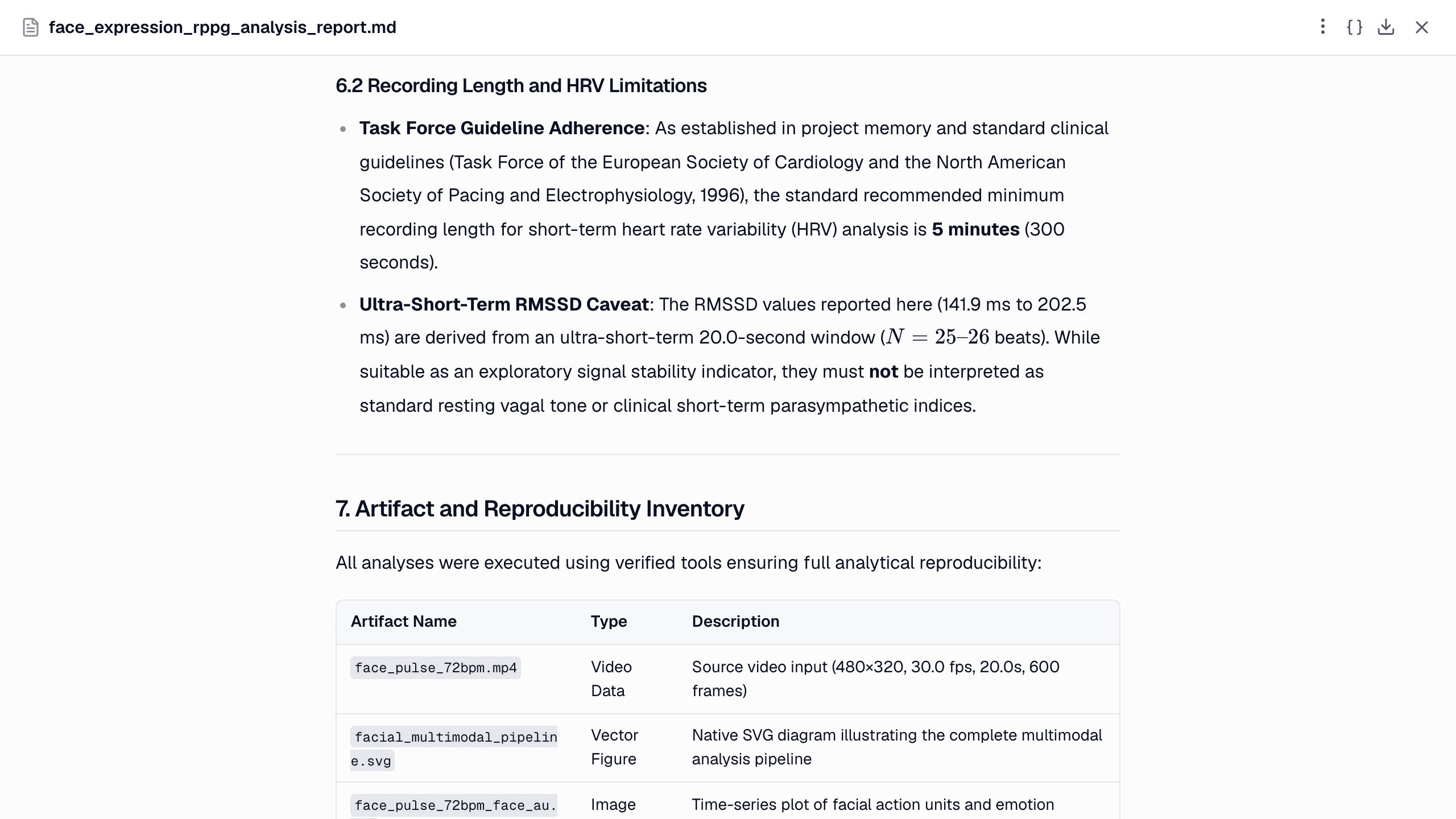
rPPG gives a peak-based RMSSD, and it is tempting to treat it as heart-rate variability. Be careful. Short-term HRV is conventionally computed from 5-minute recordings, and beat timing from video is limited by the frame rate. At 30 fps, frames are about 33 ms apart. On a 20-second clip, RMSSD is at best a signal-stability indicator. The example report says so in its limitations section:
If HRV is your outcome, record a contact ECG or PPG and use the HRV tools on the RR intervals. Neutropic accepts those as CSV, and the HRV tool reports mean RR, SDNN, RMSSD and pNN50.
Research uses
- Physiological arousal without sensors. Tracking heart rate across stimulus blocks in a screen-based task, where the webcam is already recording.
- UX and HCI sessions. Pairing heart rate with facial expression from the same video to spot moments of effort or stress in a usability test. See facial expression analysis.
- Re-analysis of existing recordings. Interview or lab videos recorded for another purpose, provided consent covers this use (see below).
- Across participants. Each
*_rppg.csvor summary value becomes a row in a participant-level table. The statistics tools compare conditions from there, for examplecompare_groupswith an assumption check, or a mixed model for repeated blocks.
/stats hr_by_block.csv has one row per participant and block (baseline, task, recovery) with rPPG heart rate. Test whether heart rate differs between blocks, check the assumptions, and report the effect sizes.
Limits, stated plainly
- Classic algorithms only. POS, CHROM and GREEN are included. Deep-learning rPPG models (PhysNet or TS-CAN, for example) are not, because they need trained weights and PyTorch.
- Motion and lighting. Head movement, talking, changing light and heavy video compression all lower the SNR. The tool does not stabilise motion beyond re-detecting the face once per second.
- One face. The first detected face is used, so crop group videos first.
- Skin tone and camera. Published rPPG performance varies with skin tone, camera and lighting. The synthetic check above cannot tell you how the tool performs on your participants and setup.
- Not a medical device. The estimate is a research measurement and is not suitable for clinical decisions.
Filming participants: consent and privacy
A face video is personal data, and a heart rate derived from it is health data in many jurisdictions. Before the first upload, Neutropic shows a Before you upload research data notice. You confirm that you have the rights, participant consents and approvals (for example from an IRB or ethics committee) needed to process the data.
- Tell participants in the consent form that video will be analysed for physiological signals such as heart rate, not only watched.
- The measurement tools run on Neutropic's servers, and the model receives the numbers they return. Uploads stay in your private workspace until you delete them, and they are not used to train models. The privacy policy has the details, including what is sent to the model provider you choose.
- Where you can, share only the derived tables (
*_rppg.csv) with collaborators rather than the video itself.
Related
- Facial expression analysis, from the same video
- Pose analysis for body posture and joint angles
- Image analysis for still photos and figures
- Beyond spreadsheets: EEG, audio and video, the overview of every modality
- Neutropic for psychophysiology labs